Welcome!
Vintage Web 2.0 aesthetics,
snippets of code,
thoughts, photography,
and a bit of charm. History of the siteLinux
Everything that concerns. Go to categoryElectronics
micro, radio,
and usual. Go to categoryPhoto
From different categories. View category
- This is an original category in English «Linux»
- Читати цей розділ українською «Лінукс»
- Читать этот раздел на русском «Линукс»
Connecting to isolated system environments using Waypipe
5/May/2026 zero-trustsecuritywaypipewayland

aluminium-tin-foil-hat_exw.jpg
Continuing with the previous boring opuses about environment isolation, it’s time to remember Wayland.
Of course, this is not a call to action, but just simple examples and reflections.
I personally adhere to a philosophy where the user is the center of the system, and he has the right to configure everything as he sees fit, and not as it is imposed by general trends, or as it is implemented in a specific distribution, at the same time understanding and accepting all the risks and consequences of these actions.
As the saying goes, “If you know what you are doing.”
And before we begin, it’s worth writing again that:
- Yes, I understand that this is all very superficial.
- Yes, any connections to the local graphical shell are not allowed for anything dangerous, and you must use VNC or virt-viewer/spice.
- Unprivileged LXC should be replaced with Xen / KVM
- And yes, I know that it is possible to breakout from KVM isolation too.
- I know about Flatpak.
- And finally, yes, I have known about Qubes OS and its architecture, let’s say, since its inception, which was 2010.
And, simplifying and adapting QubesOS ideas to my everyday needs, I prefer to use either other local users or lightweight unprivileged LXC environments.
And yes, I don’t run anything potentially dangerous in them, but rather something that many of you use directly under your system account, for example:
- Firefox for everyday use and casual browsing.
- Several projects using packages from PyPI, RubyGems.
- Separately, what I compile from sources from GitHub.
- Third-party programs, such as element-desktop, Telegram, Zoom.
Installing Debian on a RAID with LUKS encryption, ZFS root, and booting from USB with Detached Header
4/May/2026 mdadmzfsluksusb-bootdetached-header

Introduction from afar
Not long ago I felt nostalgic inside FreeBSD again, everything is wonderful, everything is familiar, everything is convenient.
There is just one point that completely rules it out from desktop use, at least for me.
On almost all my laptops, FreeBSD does not support either sleep or standby modes (s2disk/s2ram).
And I couldn’t do anything with the hardware/drivers/ACPI, but I tried a lot.
Without standby mode, it is completely impossible to use a laptop, since after transportation, you need to load everything again, turn it on, and restore a complex work session.
And I only reboot workstations after applying updates that require it.
One of the many nice little things that Beastie has that Debian lacks is ZFS Boot Environments, this is somewhat more convenient than, say, LVM snapshots.
And the second is GEOM_ELI, which supports not only, like LUKS, the OR password OR key mode, but also supports password WITH key mode.
I thought and thought, and decided to deploy Debian from scratch, taking into account all the tools I use, my experience, and, importantly, my habits.
Debian is still my main system, so the only way to get a hardware (physical) encryption key in addition to the password is to make it from the header and place it on a bootable USB flash drive.
How to (and how not to) maintain your system, GIT and packages
10/January/2026 zero-trustsecurity

good_admin_and_his_server_exw.jpg
Let’s consider a standard situation where you have a main work computer on which you have three different projects.
One project is on nodejs, the second is a production project on python, and the third is your personal “pet project”, also on python.
You also have personal and work email in the same system, and, say, a browser and home-banking.
And all this under your login.
Well, not under the root login, of course! ¯\_(ツ)_/¯
Everything is quite normal.
Many technically competent developers may have dozens of such projects.
And dozens of keys for SSH or GIT servers.
An example with the popular PyTorch framework
It’s quite ordinary: you write your code, commit it from time to time, and then a torchtriton update arrives in your cozy pet project.
And after that, the following data sets were transferred from your system, in accordance with the binary’s main function:
- Get system information:
nameservers from /etc/resolv.confhostname from gethostname()current username from getlogin()current working directory name from getcwd()environment variables
- Read the following files:
/etc/hosts/etc/passwdThe first 1,000 files in $HOME/*$HOME/.gitconfig$HOME/.ssh/*
The update arrived and the confidential data flew away.
It’s not just everything under your account (and possibly the system) has been compromised, but also, down the chain, everything you managed, committed to, and connected to.
Installing Major Python Versions on Debian Trixie

Very, very often you have to deal with the need to use a certain version of Python, for example, for torch, or for something specific.
Using conda or Docker with nvidia-container-toolkit and then setting up images like nvidia/cuda:13.0.1-runtime-ubuntu22.04 feels counterintuitive to me, even though I’ve done it many times.
And an additional packages have to be installed in the container.
But easier and more convenient to compile everything on the host system, and at the same time prevent contamination of the entire system with third-party libraries and executable files.
The following is an example of building multiple Python versions for the verpy group only, which is a bit more convenient than installing for just one user.
ai- an arbitrary user from whom the compilation is performed.verpy- the group that will be allowed to use these versions.
mkdir /opt/openssl
mkdir /opt/python
groupadd --gid 42398 verpy
usermod -aG verpy ai
GitLab Agent Server Unauthorized error
25/November/2025 kubernetesgitlabagentk
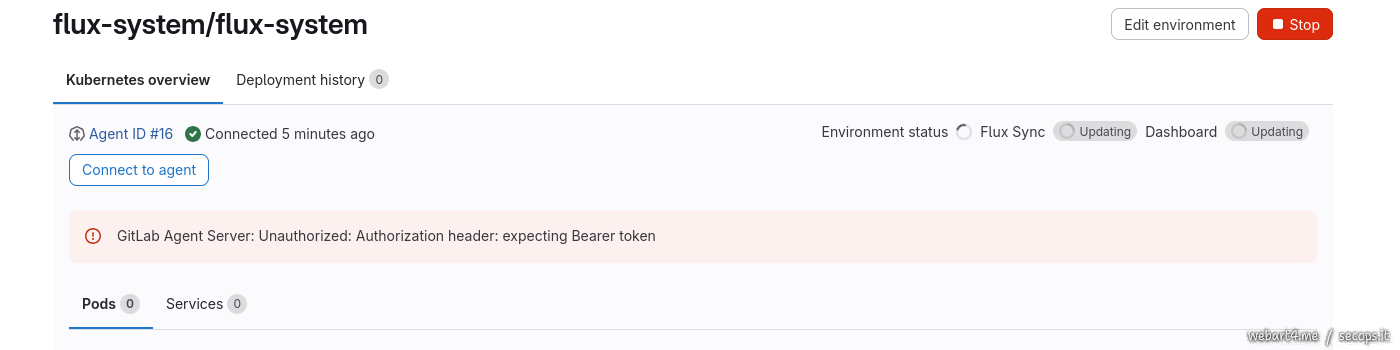
Without going into detail about how exactly and why everything is organized, access is provided through the following chain:
1 | |
The Main Frontend manages the gitlab subdomain, which is closed to external access via auth_basic authorization.